
For contractors Early version
One simple place to manage your maintenance work.
Free to join. Find jobs, quote, book and invoice. All from your phone.
Already invited by a strata business? Use the link they sent you; your login works across every business. Contractors aren't charged for leads.
 Illustrative photo
How it works
Six steps, all from a phone.
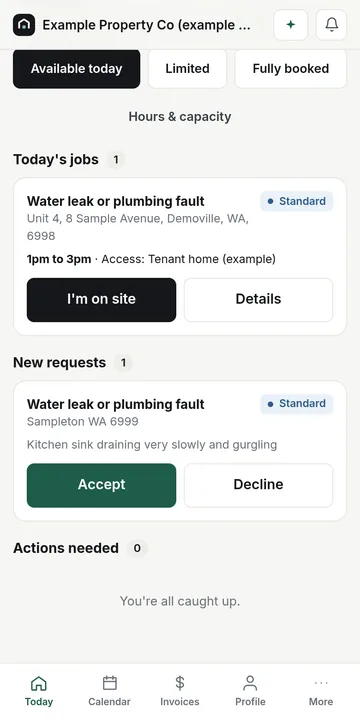
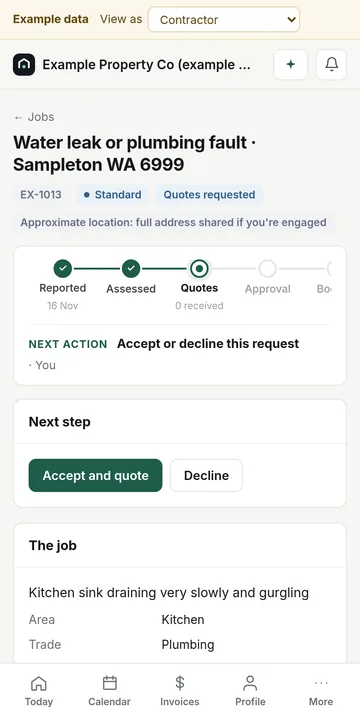
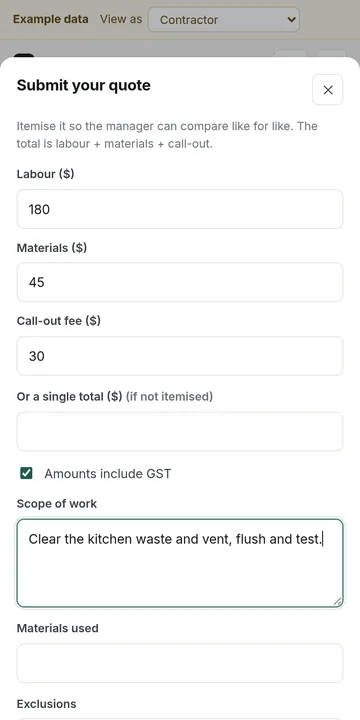
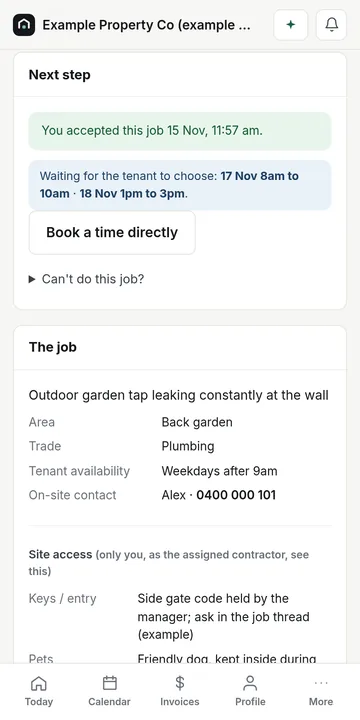
Real screens from the example workspace, with fictional data.
 1
Receive a job
New requests land on a Today screen built for a phone, with the trade, suburb and photos. The full address is shared once you're engaged.
 2
Accept or decline
One tap either way. Declining with a reason doesn't count against you.
 3
Submit a quote
Itemise labour, materials and call-out, list exclusions and dates. Revise it until the manager decides.
 4
Schedule the work
Offer a few times and the tenant picks one, in the app or with a secure link. Access notes are shown only to you.
 5
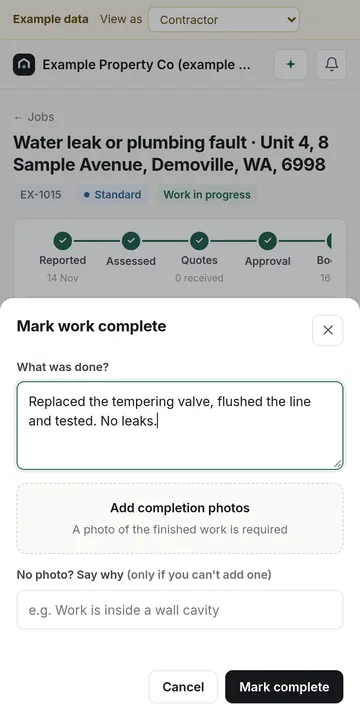
Complete the job
Add a photo of the finished work (or say why you can't), then invoice. Extra work found on site goes to the manager as a variation first.
 6
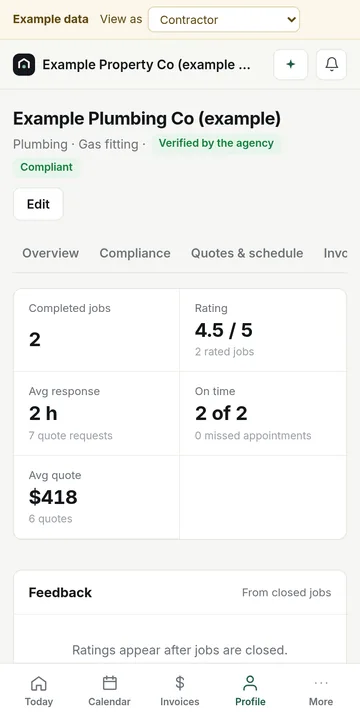
Build a reputation
Your record comes only from completed jobs and shows how it's worked out. No-access visits and manager cancellations don't count against you.
Availability
Only get jobs you can attend.
- Set your working hours (Perth time), an emergency on-call window and how many visits you can take a week
- Mark yourself "Fully booked until" a date with one tap; you won't be matched to jobs needed before then
- Requests that arrive outside your hours start your response clock when your hours begin
- Booked visits and calendar blocks are counted automatically
A fair record
Your reputation, worked out in the open.
- Ratings and on-time figures come only from jobs completed through Mycel
- Complex jobs count for more than simple ones
- No-access visits, manager reschedules and cancellations by the manager or tenant don't count against you
- New businesses start from a neutral score, labelled "New to Mycel", not from zero
- One reputation across every strata business; each business's private notes about you stay private to them
- Sponsored placements never affect scores or rankings
Verification
Approved before you're visible or can apply.
Your marketplace profile isn't visible, and you can't browse or apply for open-marketplace jobs, until it's approved. An ABN identifies your business; it isn't proof of a licence, so upload your licence and insurance certificates.
- 1
Submitted
You've created your profile and uploaded your licence and insurance.
- 2
Under review
We check the documents against the details you gave.
- 3
Approved
Strata businesses can find and invite you, and you can browse and apply for open-marketplace jobs.
- 4
Rejected or suspended
We tell you why and what to fix. You can't be found or apply until it's resolved.
Strata businesses can still invite their own contractors directly, and check them themselves.
Questions
Good to know
What does it cost?
Joining is free, and you're never charged for leads or job requests. Optional advertising (a sponsored listing, featured profile, promoted service area, sponsored trade category or a premium package) is available by enquiry from your workspace.
How does sponsored advertising work?
A sponsored placement appears in a separate slot labelled "Sponsored", only on jobs you're eligible for, with a "Why am I seeing this?" explanation. It never changes your score, ranking or emergency eligibility, and the manager always chooses who is engaged.
How does the open marketplace work?
When a strata business publishes a job to the open marketplace, verified contractors whose trade, area and availability fit can see it, with the suburb only. You apply or quote; the manager compares and chooses. Nothing is awarded automatically. Applying adds you to that business's network.
Do I need a separate login for each strata business?
No. One login, and each business's jobs, messages and invoices stay separate from the others.
Does Mycel pay my invoices?
No. Payment status in your workspace is for tracking only; the strata business pays you the way it does today.
Who sees the tenant's details and access notes?
Only the contractor engaged for that job. Before you're engaged you see the suburb and the job details, not the full address.
Are business insights available?
An early version shows acceptance rate, quote conversion, response time, repeat customers and outstanding payments from your own records. It says "Not enough data yet" until there's enough to be meaningful.